Home Download Buy Now Contact Us
PDF Tools
  TIF to PDF Converter
  PDF Protection Remover
  PDF Encrypt
  PDF to Image Converter
  PDF to Text Converter
  PDF Image Extractor
  PDF Splitter and Merger
  Document Converter
  HTML to PDF Converter Free
  Image to PDF Converter Free
Awards:
 
PDF to Image Converter
Version 4.2 (2012-12-21)

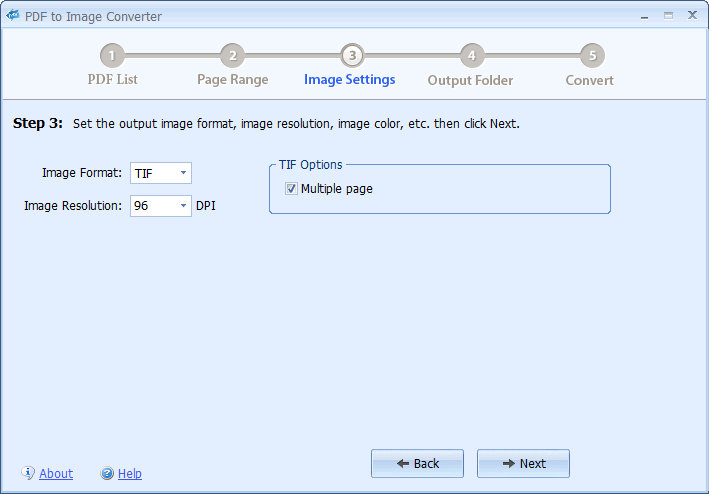
PDF to Image Converter is a quick and easy-to-use batch PDF converting utility that is designed to convert PDF documents to image files. The output image can be JPG, TIF, GIF, PNG, JP2 (JPEG 2000), BMP and EMF formats. It is able to convert encrypted PDF documents and allows you to choose to convert all pages or specified pages. PDF to Image Converter is standalone software, Adobe Acrobat Reader is NOT required. PDF to Image Converter doesn't depend on any print driver so it will NOT install any print driver on your computer.

Now the new version supports command line. Click here to learn the command line usage.

Only $49.95
Click either button to Buy via PayPal or RegNow:
All upgrades are FREE!
 

PDF to Image Converter is able to convert:

  • PDF to JPG
  • PDF to TIF
  • PDF to GIF
  • PDF to PNG
  • PDF to JP2 (JPEG 2000)
  • PDF to BMP
  • PDF to EMF
Main Features:
  • Quickly converts PDF documents to image files.
  • Supports many popular image formats.
  • Does NOT need Adobe Acrobat software.
  • Doesn't depend on any print driver.
  • Batch converts PDF documents.
  • Supports command line
  • Supports encrypted PDF documents.
  • Supports RGB/CYMK/Gray/Lab color.
  • Supports multi-page TIF format.
  • You may choose to convert all pages or specified pages.
  • Support all languages.
  • Converts PDF to vector format (EMF).

Minimum requirements:
1) Windows XP / Vista / Windows 7 / Windows 8
2) About 15 MB of disk space for installation.

Command line usage:
Usage: PDF2Image </i:input file> </o:output folder> [options]
Options:
/? or /h or -h or -? Display the usage information
/f:[image format] Set the output image format. The parameter can be: jpg,tif,gif,png,jp2,bmp,emf
/r:[first page-last page] Set the page range. For example: /r:5-1
/d:[DPI] Image Resolution. For example: /d:144. The default DPI is 9
/q:[quality] If the output format is jpg, you may use this parameter to set the JPEG Quality. From 0 to 100. The default jpg quality is 75
/m If the output format is tif, you may use this parameter to save multi-page TIF image file
/p:[password] The password to read the encryped PDF document

For example:
PDF2Image /i:test.pdf /o:c:\pic /f:jpg
PDF2Image /i:c:\pdf\a.pdf /o:c:\pic /f:tif /m
PDF2Image /i:c:\pdf\a.pdf /o:c:\pic /f:jpg /r:5-10 /q:85 /d:120 /p:pwkjdf
* all parameters are NOT case sensitive. So /f:jpg=/F:JPG, /q:80=/Q:8

100-Day 100% Money-Back Guarantee


What will happen after I send the order?
1) You will receive an email confirming your order immediately after sending the online order form.
2) Then
* For instant PayPal payment, you will receive a second email with your registration code in about 5 minutes.
 

If you want to Convert PDF Documents to Text files, please try PDF to Text Converter.

 
Copyright © 2008- PDFArea Software. All rights reserved.